Your AI assistant has never heard of your advertisers
Your sales team is probably already using AI. Reps paste notes into ChatGPT to clean up a follow-up email. Managers ask Claude to help structure a forecast review. It helps, up to a point.
The problem is what those tools don’t know. ChatGPT has never seen your rate card. Claude doesn’t know what Harbor & Field spent with you last year, or that their renewal is due next month. So the answers come back generic, and sometimes wrong.
Astro is how we’re closing that gap. It’s the AI layer built into Ad Orbit, and it connects the AI tools your team already uses to the customer, sales, order and invoice data you already keep in Ad Orbit.
What Astro is
Astro is Ad Orbit’s AI layer, and it has two parts:
- An assistant inside Ad Orbit. It works right where your team already spends its day: the calendar, company search, and account records.
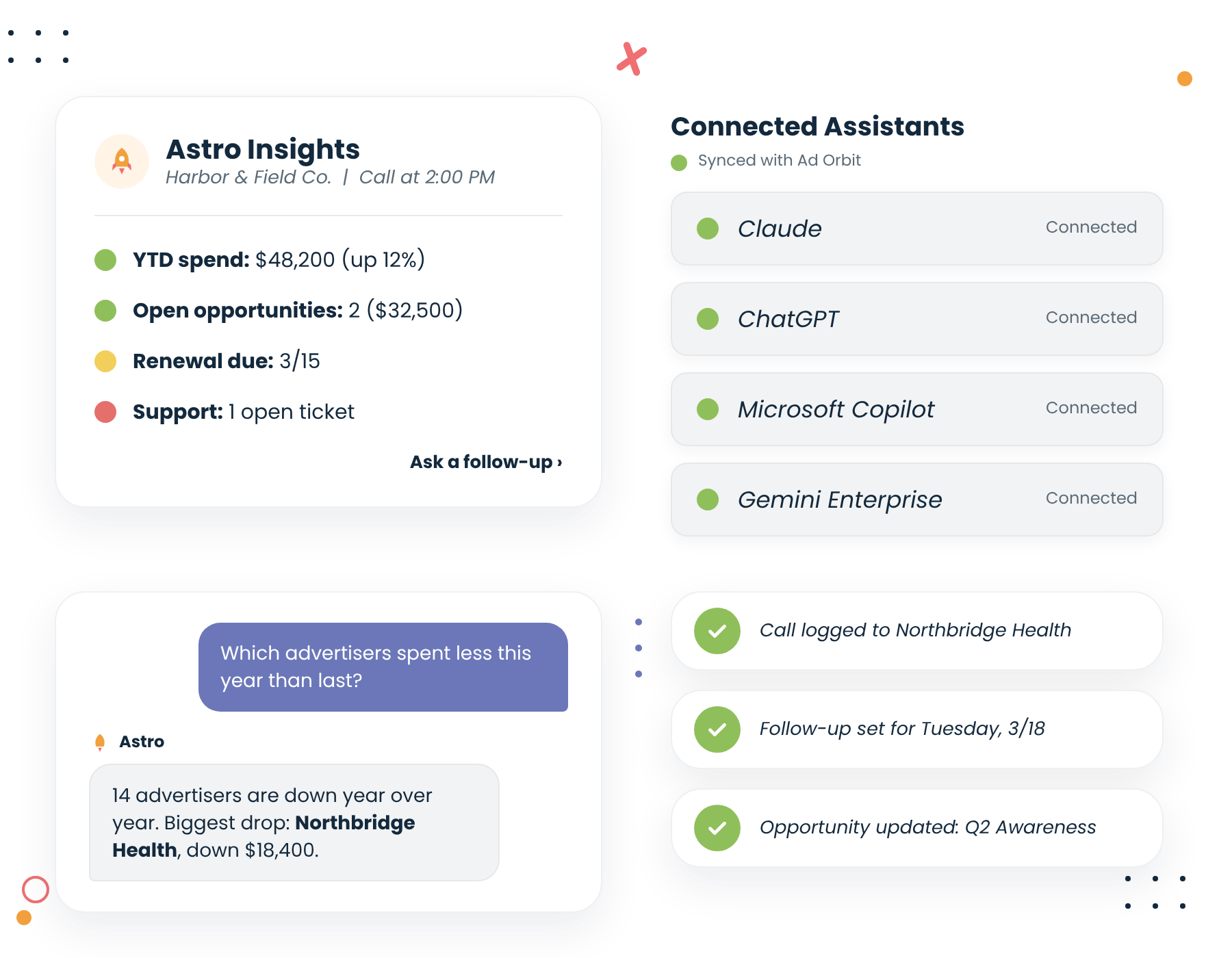
- The Ad Orbit MCP server. It securely connects Ad Orbit to outside AI assistants like Claude, ChatGPT and Gemini Enterprise, so your data comes along wherever your team does its AI work.
Both are included with every Ad Orbit edition. There’s nothing to install for the in-app assistant, and connecting an outside assistant takes a few minutes.
Astro inside Ad Orbit
The in-app assistant is built around the moments where reps lose the most time.
Meeting prep in one click. Open an appointment on your Ad Orbit calendar and click Astro Insights. You get a briefing on the advertiser before the call: recent spend, open opportunities, past activity and anything that needs attention. A chat panel slides out so you can ask follow-up questions without leaving the page.
Advertiser summaries from search. Hover over a company in your search results and Astro gives you a quick read on the account. It’s the fastest way to get up to speed on an advertiser you haven’t touched in a while.
Questions in plain English. Ask about sales, pipeline, accounts, activities, invoices or support history the way you’d ask a colleague. “Which advertisers spent less this year than last?” gets you a list, not a report request.
Drafts grounded in real history. Follow-up emails and recap notes start from what actually happened on the account, so they need editing, not rewriting.
The Ad Orbit MCP server
MCP, or Model Context Protocol, is an open standard that lets AI assistants securely work with business systems. Think of it as a universal adapter between an AI tool and the software your business runs on.
With the Ad Orbit MCP connected, a rep or sales leader can work in Claude or ChatGPT and have it:
- Look up companies and contacts
- Review opportunities and forecasts
- Analyze sales and invoice data
- Log calls, notes, appointments and to-dos back into Ad Orbit
That last one matters. The work your team does in an AI assistant doesn’t disappear into a chat window. It lands in Ad Orbit, where the rest of the team can see it.
Security works the way you’d expect. Each person signs in with their own Ad Orbit credentials through OAuth, and they only see the data their Ad Orbit permissions already allow. A rep who can’t see another rep’s accounts in Ad Orbit can’t see them through Claude either.
Getting connected takes three steps:
- Add the Ad Orbit connector in your AI assistant.
- Sign in with your Ad Orbit account.
- Start asking.
What it looks like day to day
Reps and sales leaders use Astro differently, so we built prompt playbooks for each role. Here are a few examples of what people ask.
| Role | What they use it for | Example prompt |
|---|---|---|
| Sales rep | Call prep | “Brief me on Northbridge Health before my 2pm. What did they run last year, and what’s open?” |
| Sales rep | Follow-up | “Draft a recap of today’s call and log it as a note on the account.” |
| Sales rep | Renewals | “Which of my accounts have renewals in the next 60 days and no activity in the last 30?” |
| Sales leader | Pipeline | “How does Q1 pipeline compare to this time last year, by rep?” |
| Sales leader | Revenue trends | “Which advertisers spent less this year than last, and by how much?” |
| Sales leader | Team activity | “Who on the team logged the fewest calls this month?” |
None of these require building a report, exporting to a spreadsheet, or waiting on someone else. The question goes in, and the answer comes back from your own data.
Where Astro fits with Ad Orbit reporting
Astro doesn’t replace Ad Orbit’s reports and dashboards. Those still cover the big picture: the numbers your team reviews every week and the views leadership checks every month.
Astro handles everything in between. It’s the one-off question in the middle of a one-on-one, the five minutes before a call, the follow-up that needs to go out today. Same data, same system of record, just available in the moment and wherever your team is working.
Frequently asked questions
What is Astro?
Astro is the AI layer built into Ad Orbit, the contract-to-cash platform for media publishers. It includes an AI assistant inside Ad Orbit and an MCP server that connects Ad Orbit data to outside AI assistants.
Which AI assistants does the Ad Orbit MCP work with?
The Ad Orbit MCP works with Claude, ChatGPT and Gemini Enterprise. Because MCP is an open standard, other assistants that support it can connect too.
Does Astro cost extra?
No. Every Ad Orbit edition includes Astro along with a monthly usage allotment. Teams that need more can add usage through consumption pricing.
Can Astro see data a user isn’t allowed to see?
No. Each user signs in with their own Ad Orbit account, and Astro follows the same permissions they have in Ad Orbit.
Can Astro update records in Ad Orbit?
Yes. Through the MCP, an AI assistant can log calls, notes, appointments and to-dos back to Ad Orbit, so the work stays in your system of record.
See Astro in action
Your data already has the answers. Astro puts them in front of your team at the moment they need them.
If you’re an Ad Orbit customer, your admin can get your team connected today. Visit the Astro AI page for setup details. If you’re new to Ad Orbit, watch the 5-minute demo or book a personalized walkthrough and we’ll show you Astro working with real publisher data.